The Last Step Most People Rush Through
You have done the hard work. You have assessed your skills, researched the job market, written a strong CV, tailored it carefully to the role, and crafted a cover letter that actually says something meaningful. Now you just need to send it.
And this is exactly where a surprising number of people trip up.
Sending a job application sounds like the easy part. But the way you submit your application is itself part of the impression you make. A poorly written email, a badly named file, a missing attachment, or a submission sent to the wrong address can undermine all the effort you put into the application itself. In some cases, it can get your application discarded before anyone even opens your CV.
The good news, as always, is that these mistakes are completely avoidable. This article covers everything you need to know about submitting a job application properly, whether you are applying by email, through an online portal, or in person.
The Two Main Ways to Submit a Job Application
Before we get into the details, it helps to know that most job applications in South Africa are submitted in one of two ways.
By email is still very common, particularly for smaller companies, SMEs, and roles that are advertised through networks or social media rather than formal job portals. The job advertisement will typically say something like “Please send your CV and cover letter to careers@companyname.co.za.”
Through an online portal or application form is increasingly common, particularly for larger corporates, government positions, and roles advertised through platforms like Careers24, PNet, or a company’s own website. In this case, you typically create a profile, upload your documents, and complete an online form.
Each method has its own set of considerations. Let us look at both.
Applying by Email: Getting Every Detail Right
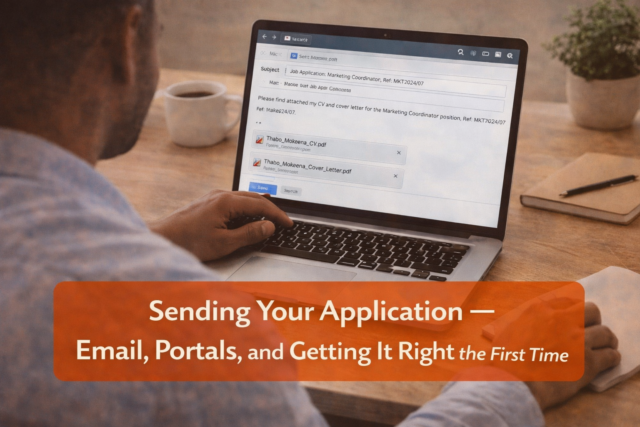
When you are submitting a job application by email, the email itself is part of your application. It is not just a delivery mechanism. Think of it as a very short, professional introduction, a mini cover letter that sets the tone before the recruiter even opens your attachments.
The Subject Line
The subject line of your application email is more important than most people realise. It is the first thing the recruiter sees, and in a busy inbox, it determines whether your email gets opened promptly or pushed aside.
A good subject line is clear, specific, and professional. It should include the name of the position you are applying for and, if an application reference number was given in the job advertisement, include that too.
Good examples:
- Application: Marketing Coordinator, Ref: MKT2024/07
- Job Application, Sales Representative, Johannesburg
- Application for Finance Administrator Position
Avoid vague subject lines like “CV Attached” or “Job Application” or, even worse, leaving the subject line blank. These look careless and make it harder for the recruiter to organise and find your email later.
The Body of the Email
The body of your email should be short and professional. If you have written a separate cover letter document, your email body does not need to repeat it in full. A brief, well-written introduction is all that is needed.
Here is a simple structure that works well:
- A greeting, addressed to the named person if you know it, or “Dear Hiring Manager” if not
- One short paragraph stating the role you are applying for and where you saw it advertised
- One short paragraph summarising, in just two or three sentences, why you are a strong candidate
- A note about what you have attached
- A professional sign-off with your full name and contact number
Here is an example of what this looks like in practice:
Dear Ms Khumalo,
I am writing to apply for the position of Customer Service Team Leader as advertised on Careers24 on 14 October 2024.
I bring six years of experience in customer-facing roles within the retail banking sector, including two years in a supervisory capacity managing a team of eight. I am confident that my background in complaint resolution, staff development, and process improvement makes me a strong match for this role.
Please find attached my CV and cover letter for your consideration. I would welcome the opportunity to discuss my application at your convenience.
Kind regards, Thabo Mokoena 082 000 0000
That is it. Clear, professional, concise, and easy to read. It does not repeat the entire cover letter. It just creates a good first impression and invites the recruiter to open the attachments.
Naming Your Attachment Files
This is a small detail that makes a real difference, and almost nobody talks about it.
When a recruiter receives fifty applications in a day, many of them will have attachments called things like “CV.pdf” or “My CV updated final.docx” or “curriculum vitae 2023 NEW.pdf.” These files are a nightmare to manage and they look sloppy.
Name your files clearly and professionally, using your own name and the document type. Here are good examples:
- Thabo_Mokoena_CV.pdf
- Thabo_Mokoena_Cover_Letter.pdf
This way, when a recruiter saves your documents to their computer or shares them with a colleague, your name is immediately visible. It shows organisation and professionalism in a small but meaningful way.
Sending Your Documents as PDFs
As mentioned in Article 3, always save and send your CV and cover letter as PDF files unless the employer specifically requests a different format.
PDFs preserve your formatting exactly as you designed it, regardless of what device or software the recipient uses to open them. A Word document that looks perfect on your phone might display with broken formatting on someone else’s computer, which can make even a beautifully designed CV look like a mess.
Most word processing programmes, including Microsoft Word, Google Docs, and LibreOffice, allow you to save or export a document as a PDF with just a few clicks.
Attachments: Always Double Check
Before you hit send, open each attachment and confirm that it is the right document and the correct, most recent version. It sounds obvious, but it is an easy mistake to make, especially if you have multiple versions of your CV saved on your phone or computer.
Also, check that the attachments are not too large. Some email systems block attachments over a certain size. For a CV and cover letter in PDF format, the combined file size should be well under 5MB, which is typically not a problem, but it is worth checking.
Proofread the Email Before Sending
Read your email carefully before you send it. Check the spelling of the recruiter’s name and the company name. Make sure the role you mentioned in the email matches the role you are actually applying for. Confirm that the email address you are sending to is exactly right.
A quick check takes thirty seconds. Sending an email addressed to the wrong person, with the wrong job title mentioned, or with a typo in the recruiter’s name, is the kind of mistake that is almost impossible to recover from gracefully.
Send a Test Email to Yourself First
If you want to be extra careful, send the email to yourself first before sending it to the employer. This lets you see exactly what the recruiter will see when they open it, including how the attachments look, whether the formatting is correct, and whether everything reads clearly on screen.
Applying Through an Online Portal
Online application portals are a bit more structured than email applications, which in some ways makes them easier. The form tells you exactly what information to provide and where. But there are still a few things worth being careful about.
Complete Every Field
When filling in an online application form, complete every field that is relevant to you. Leaving sections blank without good reason can make your application look incomplete or suggest that you did not bother to read the form properly.
If a field asks for information that is not applicable to your situation, most forms will have an option like “N/A” or “Not applicable.” Use it rather than leaving the field empty.
Upload the Correct Documents
Most portals will ask you to upload your CV, and sometimes your cover letter as well. Make sure you are uploading the right, tailored version of each document, the one you prepared specifically for this role, not an older generic version.
Double-check the file format requirements. Some portals only accept PDFs, others only accept Word documents, and some accept either. Upload whatever format is specified.
The Online Profile Is Part of Your Application
On platforms like Careers24, PNet, or LinkedIn, you typically have a profile that employers can view in addition to the documents you submit. Treat this profile with the same care as your CV.
Make sure your profile is complete, up to date, and professional. An incomplete or outdated profile that contradicts the CV you have just submitted creates confusion and reflects poorly on you.
Keep a Record of What You Have Applied For
This is a practical point that becomes very important as your job search progresses. Keep a simple record of every application you submit. You can use a notebook, a spreadsheet, or even a note on your phone. For each application, record:
- The name of the company
- The job title
- The date you applied
- The email address or portal you used
- Any reference numbers given
- The deadline, if one was stated
This record will save you a lot of confusion later. When an employer calls you two weeks after you applied, you want to be able to immediately recall the role, the company, and the details of the job description. Nothing undermines a phone screening faster than a candidate who cannot remember applying for the position.
Following Up After Submitting
One question that comes up often is whether it is appropriate to follow up after sending an application. The short answer is yes, but with some care.
If the job advertisement gave a closing date for applications, wait until that date has passed before following up. If no closing date was given, waiting one to two weeks before checking in is generally reasonable.
A brief, professional follow-up email is the right approach. Something like this:
Dear Ms Khumalo,
I submitted an application for the Customer Service Team Leader position on 14 October and wanted to follow up to confirm that it was received and to reiterate my interest in the role.
I remain very keen on this opportunity and would welcome the chance to discuss my application further at your convenience.
Kind regards, Thabo Mokoena 082 000 0000
Keep it short. Keep it polite. Do not follow up more than once. And do not follow up at all if the advertisement specifically said “no phone calls” or “no follow-ups,” because ignoring that instruction is itself a red flag for an employer.
Applying in Person
In some industries and for some roles, particularly in retail, hospitality, construction, and domestic services, handing in a physical CV in person is still common and in some cases expected.
If you are applying in person:
- Print your CV on clean, white paper. Use a printer with good-quality ink and make sure there are no smudges or faint text.
- Do not fold your CV. Carry it in a clear plastic sleeve or a folder so it arrives neat and flat.
- Dress neatly and professionally when you go in. You may be meeting the hiring manager without any warning, and first impressions are formed in seconds.
- Be polite and friendly to everyone you interact with, from the receptionist to the security guard. In smaller companies, especially, word travels fast about how applicants conduct themselves.
- Ask who you should address your application to, and if possible, hand it directly to that person rather than leaving it at reception.
The Small Details Add Up
None of the things covered in this article are complicated. But taken together, they make a real difference to the impression your application creates. A professional subject line, a well-written email body, correctly named PDF attachments, a complete and accurate application form, and a timely follow-up all signal to the employer that you are organised, thorough, and genuinely serious about the role.
In a pile of applications where most people have rushed the submission without thinking about these details, yours will stand out. And standing out, for the right reasons, is exactly what you are aiming for.
Before You Move On, Complete These Steps
This is where everything comes together. A strong application can still fail if it is submitted poorly, so take your time and get this right.
- Select 1 Job and Prepare a Full Application
Choose one job and prepare:- Your tailored CV
- Your tailored cover letter
- Write Your Application Email
If applying by email:- Create a clear subject line (Job Title + reference if given)
- Write a short, professional email message
- Keep it brief and to the point
- Name Your Files Properly
Rename your documents clearly:- YourName_CV.pdf
- YourName_CoverLetter.pdf
- Check Your Attachments
Before sending:- Open each file and confirm it is correct
- Make sure you are using the latest version
- Ensure files are in PDF format
- Proofread Everything
Carefully check:- Email spelling and grammar
- Company name and job title
- Email address you are sending to
- Send a Test Email (Optional but Recommended)
Send the email to yourself first and check:- Formatting
- Attachments
- Overall presentation
- Submit One Complete Application
Send your application confidently, knowing everything is correct and professional. - Create an Application Tracker
Start tracking your applications by recording:- Company name
- Job title
- Date applied
- Contact details or platform used
- Set a Follow-Up Reminder
Schedule a reminder:- 1 to 2 weeks after applying
- To send a polite follow-up if needed
Only move on once you have successfully submitted at least one complete, professional application.


March 26, 2026
[…] Next up: Article 6, Sending Your Application, where we cover the practical side of actually submitti… […]